物联网 基于netty构建mqtt协议规范(主题通配符订阅)
简述
在发布/订阅模式中,通配符 允许订阅者一次性订阅多个主题,极大地简化订阅逻辑
- 单级通配符
匹配当前层级任意一个主题段。例如 house/+/temperature 可以匹配 house/room1/temperature 和 house/room2/temperature,但不匹配 house/room1/light/temperature
- 多级通配符
匹配任意数量的主题段(必须出现在主题末尾)。例如 house/# 可以匹配 house/room1、house/room1/light、house/room2/temperature 等
源码(netty-sample-03-Topic)
https://gitee.com/kcnf-iot/iot-sample/tree/master/netty/netty-sample-03
通配符匹配的核心要点
| 通配符 | 说明 | 示例 |
|---|---|---|
+ | 匹配单级,只能占一个层级 | home/+/status 匹配 home/living/status,不匹配 home/living/light/status |
# | 匹配多级,必须放在末尾 | home/# 匹配 home、home/living、home/living/light 等 |
| 组合 | + 和 # 可以在不同层级 | +/+/# 匹配任何至少两级前缀的主题 |
主题通配符匹配流程
1. 存储结构
root -> home -> room1 -> [subscribers: B]
                -> + -> temperature -> [subscribers: A]
           -> sport -> # -> [subscribers: C]
2. 订阅流程
client -> SUB home/+/temperature -> root/home/+/temperature -> add client A
client -> SUB home/room1/#       -> root/home/room1/#       -> add client B
client -> SUB sport/#            -> root/sport/#            -> add client C
3. 发布流程
client -> PUB home/room1/temperature "25°C"
       -> root -> home -> room1 (exact) -> collect B (via #)
                     -> + -> temperature -> collect A (via +)
       -> push MSG to A and B
4. 匹配算法(深度遍历)
match(topic):
  node=root; levels=topic.split('/')
  for i, level in levels:
    collect node.subscribers
    if node has '#': collect all under '#'
    if node has level: go down exact
    if node has '+': go down '+'
  return collected_channels
源码
broker
package com.jysemel.iot;

import com.jysemel.iot.handler.BrokerHandler;
import com.jysemel.iot.pojo.TopicMatcher;
import io.netty.bootstrap.ServerBootstrap;
import io.netty.channel.ChannelFuture;
import io.netty.channel.ChannelInitializer;
import io.netty.channel.ChannelPipeline;
import io.netty.channel.EventLoopGroup;
import io.netty.channel.nio.NioEventLoopGroup;
import io.netty.channel.socket.SocketChannel;
import io.netty.channel.socket.nio.NioServerSocketChannel;
import io.netty.handler.codec.string.StringDecoder;
import io.netty.handler.codec.string.StringEncoder;

import java.nio.charset.StandardCharsets;

public class WildcardBroker {
    private static final TopicMatcher matcher = new TopicMatcher();

    public static void main(String[] args) throws InterruptedException {
        EventLoopGroup boss = new NioEventLoopGroup(1);
        EventLoopGroup worker = new NioEventLoopGroup();
        try {
            ServerBootstrap bootstrap = new ServerBootstrap();
            bootstrap.group(boss, worker)
                    .channel(NioServerSocketChannel.class)
                    .childHandler(new ChannelInitializer<SocketChannel>() {
                        @Override
                        protected void initChannel(SocketChannel ch) {
                            ChannelPipeline p = ch.pipeline();
                            p.addLast(new StringDecoder(StandardCharsets.UTF_8));
                            p.addLast(new StringEncoder(StandardCharsets.UTF_8));
                            p.addLast(new BrokerHandler(matcher));
                        }
                    });
            ChannelFuture future = bootstrap.bind(8888).sync();
            System.out.println("Broker started on port 8888");
            System.out.println("Support wildcards: + (single level), # (multi level)");
            future.channel().closeFuture().sync();
        } finally {
            boss.shutdownGracefully();
            worker.shutdownGracefully();
        }
    }
}
sub room
package com.jysemel.iot;

import com.jysemel.iot.handler.ClientHandler;
import io.netty.bootstrap.Bootstrap;
import io.netty.channel.*;
import io.netty.channel.nio.NioEventLoopGroup;
import io.netty.channel.socket.SocketChannel;
import io.netty.channel.socket.nio.NioSocketChannel;
import io.netty.handler.codec.string.StringDecoder;
import io.netty.handler.codec.string.StringEncoder;

import java.nio.charset.StandardCharsets;

public class RoomSubscriber {

    public static void main(String[] args) throws Exception {
        EventLoopGroup group = new NioEventLoopGroup();
        try {
            Bootstrap bootstrap = new Bootstrap();
            bootstrap.group(group)
                    .channel(NioSocketChannel.class)
                    .handler(new ChannelInitializer<SocketChannel>() {
                        @Override
                        protected void initChannel(SocketChannel ch) {
                            ChannelPipeline p = ch.pipeline();
                            p.addLast(new StringDecoder(StandardCharsets.UTF_8));
                            p.addLast(new StringEncoder(StandardCharsets.UTF_8));
                            p.addLast(new ClientHandler("Room"));
                        }
                    });

            ChannelFuture future = bootstrap.connect("localhost", 8888).sync();
            Channel channel = future.channel();

            System.out.println("[Room] Connected to broker");
            System.out.println("[Room] Subscribing: home/room1/#");

            channel.writeAndFlush("SUB home/room1/#\n").sync();

            System.out.println("[Room] Waiting for messages...\n");

            channel.closeFuture().sync();
        } finally {
            group.shutdownGracefully();
        }
    }
}
sub sport
package com.jysemel.iot;

import com.jysemel.iot.handler.ClientHandler;
import io.netty.bootstrap.Bootstrap;
import io.netty.channel.*;
import io.netty.channel.nio.NioEventLoopGroup;
import io.netty.channel.socket.SocketChannel;
import io.netty.channel.socket.nio.NioSocketChannel;
import io.netty.handler.codec.string.StringDecoder;
import io.netty.handler.codec.string.StringEncoder;

import java.nio.charset.StandardCharsets;

public class SportSubscriber {

    public static void main(String[] args) throws Exception {
        EventLoopGroup group = new NioEventLoopGroup();
        try {
            Bootstrap bootstrap = new Bootstrap();
            bootstrap.group(group)
                    .channel(NioSocketChannel.class)
                    .handler(new ChannelInitializer<SocketChannel>() {
                        @Override
                        protected void initChannel(SocketChannel ch) {
                            ChannelPipeline p = ch.pipeline();
                            p.addLast(new StringDecoder(StandardCharsets.UTF_8));
                            p.addLast(new StringEncoder(StandardCharsets.UTF_8));
                            p.addLast(new ClientHandler("Sport"));
                        }
                    });

            ChannelFuture future = bootstrap.connect("localhost", 8888).sync();
            Channel channel = future.channel();

            System.out.println("[Sport] Connected to broker");
            System.out.println("[Sport] Subscribing: sport/#");

            channel.writeAndFlush("SUB sport/#\n").sync();

            System.out.println("[Sport] Waiting for messages...\n");

            channel.closeFuture().sync();
        } finally {
            group.shutdownGracefully();
        }
    }
}
pub root|sport
package com.jysemel.iot;

import io.netty.bootstrap.Bootstrap;
import io.netty.channel.*;
import io.netty.channel.nio.NioEventLoopGroup;
import io.netty.channel.socket.SocketChannel;
import io.netty.channel.socket.nio.NioSocketChannel;
import io.netty.handler.codec.string.StringDecoder;
import io.netty.handler.codec.string.StringEncoder;

import java.nio.charset.StandardCharsets;

public class MessagePublisher {

    public static void main(String[] args) throws Exception {
        EventLoopGroup group = new NioEventLoopGroup();
        try {
            Bootstrap bootstrap = new Bootstrap();
            bootstrap.group(group)
                    .channel(NioSocketChannel.class)
                    .handler(new ChannelInitializer<SocketChannel>() {
                        @Override
                        protected void initChannel(SocketChannel ch) {
                            ChannelPipeline p = ch.pipeline();
                            p.addLast(new StringDecoder(StandardCharsets.UTF_8));
                            p.addLast(new StringEncoder(StandardCharsets.UTF_8));
                        }
                    });

            ChannelFuture future = bootstrap.connect("localhost", 8888).sync();
            Channel channel = future.channel();

            System.out.println("[Publisher] Connected to broker");
            System.out.println("[Publisher] Publishing messages automatically...");
            System.out.println();

            // 自动发布示例消息
            publishMessage(channel, "PUB home/room1/temperature 25C");
            Thread.sleep(1000);

            publishMessage(channel, "PUB sport/football/goal Goal!");
            Thread.sleep(1000);

            publishMessage(channel, "PUB home/room1/humidity 60%");
            Thread.sleep(1000);

            System.out.println("[Publisher] All messages published successfully");

            // 等待一段时间后关闭
            Thread.sleep(2000);

        } finally {
            group.shutdownGracefully();
        }
    }

    private static void publishMessage(Channel channel, String message) {
        channel.writeAndFlush(message + "\n");
        System.out.println("[Publisher] Sent: " + message);
    }
}
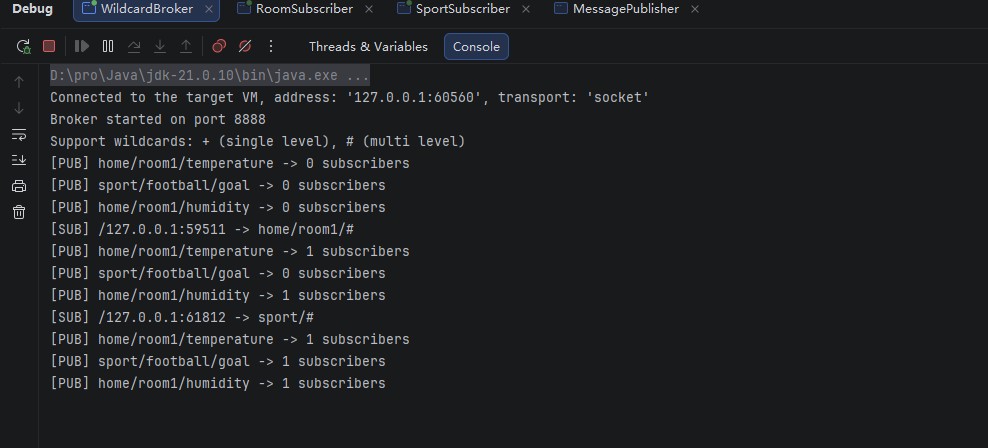
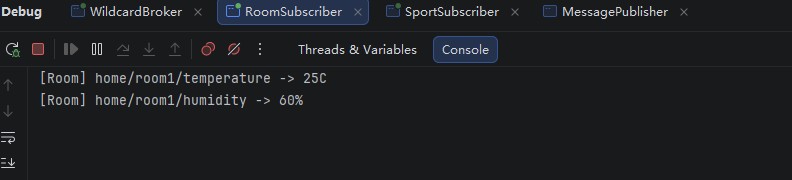
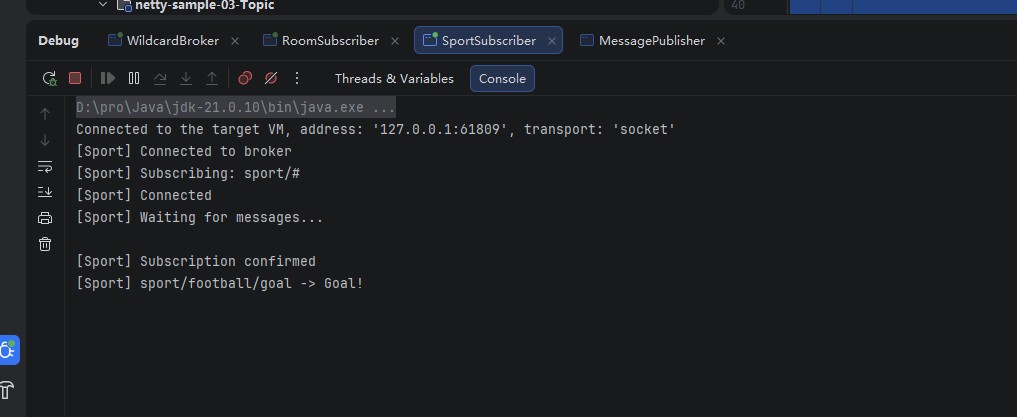
验证结果