
物联网实战|Spring Boot MQTT平台|解决产线emqx自动重连
基于emqx v6.2.2 版本
客户端网络波动断开
基于hivemq sdk,版本为1.3.15
源码
https://gitee.com/kcnf-iot/iot-sample/tree/master/emqx/emqx-sample-03
pom依赖
<dependencies>
    <!-- HiveMQ MQTT5 客户端(同时兼容 MQTT3.1.1) -->
    <dependency>
        <groupId>com.hivemq</groupId>
        <artifactId>hivemq-mqtt-client</artifactId>
        <version>1.3.15</version>
    </dependency>
</dependencies>
相关参数说明
自动重连参数
- 自动重连频率
.automaticReconnect()
    .initialDelay(1, TimeUnit.SECONDS)   // ① 首次重连等待 1 秒
    .maxDelay(5, TimeUnit.MINUTES)       // ② 最大重连间隔封顶 5 分钟
    .applyAutomaticReconnect()           // ③ 应用上述配置
- 自动重连频率效果
第 1 次重连 → 等待 1 秒
第 2 次重连 → 等待 2 秒(翻倍)
第 3 次重连 → 等待 4 秒
第 4 次重连 → 等待 8 秒
第 5 次重连 → 等待 16 秒
第 6 次重连 → 等待 32 秒
第 7 次重连 → 等待 64 秒
...
第 N 次重连 → 等待 5 分钟(封顶,不再增长)
会话超时时间参数
.sessionExpiryInterval(5, TimeUnit.MINUTES)
| 属性 | 含义 |
|---|---|
sessionExpiryInterval | MQTT 5 的会话过期时间。客户端断开后,服务端保留该会话的订阅关系和未送达消息的最长时间 |
| 设为 5 分钟 | 断网或客户端异常退出后,5 分钟内重连可以恢复原有会话(sessionPresent=true),无需重新订阅,也不会丢失离线期间的消息 |
cleanStart参数
.cleanStart(false)                              // 尝试恢复已有会话
.sessionExpiryInterval(TimeUnit.MINUTES.toSeconds(5))  // 断开后保留会话 5 分钟
| 参数 | 值 | 作用 |
|---|---|---|
cleanStart(false) | false | 连接时尝试恢复与该 clientId 关联的历史会话(订阅列表、未确认消息) |
sessionExpiryInterval(300) | 300 秒 | 断开后服务端保留会话状态的最长时间 |
clientId
| 场景 | 建议 |
|---|---|
| 希望应用重启也能恢复会话 | 把 clientId 改为固定值(如 "server_" + mqttProperties.getClientId()),配合 cleanStart(false) |
| 每次重启都是全新会话 | 保持随机 clientId,但把 cleanStart 改为 true,语义更清晰 |
| 当前代码现状 | cleanStart(false) 对随机 clientId 无实际收益,但也不会报错(sessionPresent 始终为 false) |
会话配置 和 重连时机
会话在有效期内重连 → 订阅不丢失,无需重新订阅
| 条件 | 代码 |
|---|---|
clientId 固定不变 | ❌ 随机 UUID,每次运行不同 |
sessionExpiryInterval > 0 | ✅ 设了 5 分钟 |
在 sessionExpiryInterval 时间内重连 | ✅ automaticReconnect 通常几秒到几十秒就重连 |
会话过期或 clientId 变了 → 订阅丢失,必须重新订阅
| 场景 | 结果 |
|---|---|
断线超过 sessionExpiryInterval(5 分钟) | 服务端清除会话,订阅丢失 |
应用重启( clientId 是随机 UUID) | 新 clientId,找不到旧会话,订阅丢失 |
| 服务端主动踢掉并清除了会话 | 订阅丢失 |
部分代码
package com.jysemel.iot.client;

import com.hivemq.client.mqtt.MqttClientSslConfig;
import com.hivemq.client.mqtt.lifecycle.MqttDisconnectSource;
import com.hivemq.client.mqtt.mqtt5.Mqtt5AsyncClient;
import com.hivemq.client.mqtt.mqtt5.Mqtt5Client;
import com.hivemq.client.mqtt.mqtt5.message.connect.Mqtt5Connect;
import lombok.extern.slf4j.Slf4j;
import org.springframework.context.annotation.Bean;
import org.springframework.context.annotation.Configuration;

import javax.net.ssl.TrustManagerFactory;
import java.io.InputStream;
import java.security.KeyStore;
import java.util.UUID;
import java.util.concurrent.TimeUnit;

@Slf4j
@Configuration
public class MqttConfig {

    @Bean
    public  Mqtt5AsyncClient mqtt5AsyncClient() {
        // 1. 加载CA根证书,构建SSL信任配置
        MqttClientSslConfig sslConfig = buildSslConfig();
        // 2. 构建MQTT TLS客户端
        String clientId = "server_" + UUID.randomUUID().toString().substring(0, 16);
        // 认证信息必须配置在 builder 级别,否则 automaticReconnect 重连时会丢失
        // 3. 构建连接报文
        Mqtt5AsyncClient client = Mqtt5Client.builder()
                .identifier(clientId)
                .serverHost("192.168.0.19")
                .serverPort(18085)
                .sslConfig(sslConfig)
                // 认证信息放在 builder 里,重连时会自动携带
                .simpleAuth()
                .username("emqx")
                .password("123456".getBytes())
                .applySimpleAuth()
                // 自动重连配置
                .automaticReconnect()
                .initialDelay(1, TimeUnit.SECONDS)
                .maxDelay(5, TimeUnit.MINUTES)
                .applyAutomaticReconnect()
                // 连接成功监听器(包括重连成功)
                .addConnectedListener(context -> {
                    log.info("MQTT 连接已建立 | clientId={}", clientId);
                })
                // 断开连接监听器
                .addDisconnectedListener(context -> {
                    Throwable cause = context.getCause();
                    MqttDisconnectSource source = context.getSource();
                    if (cause != null) {
                        log.error("MQTT 连接断开 | clientId={} | source={} | 原因: {} | 自动重连中...", clientId, source, cause.getMessage(), cause);
                    } else if (source == MqttDisconnectSource.SERVER) {
                        log.warn("MQTT 被服务端断开 | clientId={} | source={} | 自动重连中...", clientId, source);
                    } else if (source == MqttDisconnectSource.USER) {
                        log.info("MQTT 用户主动断开 | clientId={} | source={}", clientId, source);
                    } else {
                        log.warn("MQTT 连接断开 | clientId={} | source={} | 自动重连中...", clientId, source);
                    }
                    // 用户主动断开(如应用关闭)不推送告警,仅异常断开推送
                    if (source == MqttDisconnectSource.USER) {
                        return;
                    }
                })
                .buildAsync();
        // 4. 发起异步连接
        Mqtt5Connect connectMsg = Mqtt5Connect.builder()
                // 尝试恢复已有会话
                .cleanStart(false)
                // 会话过期时间 5 分钟:断开后服务端保留会话状态(订阅、未确认消息)300 秒
                .sessionExpiryInterval(TimeUnit.MINUTES.toSeconds(5))
                .keepAlive(60)
                .build();
        // 4. 发起异步连接
        client.connect(connectMsg)
                .whenComplete((connAck, throwable) -> {
                    if (throwable != null) {
                        log.error("MQTT 初始连接失败 | clientId={} |   | 错误: {}", clientId , throwable.getMessage(), throwable);
                        return;
                    }
                    log.info("MQTT 初始连接成功 | clientId={} | reasonCode={} | sessionPresent={}", clientId, connAck.getReasonCode(), connAck.isSessionPresent());
                });

        return client;
    }

    private MqttClientSslConfig buildSslConfig() {
        try {
            KeyStore trustStore = KeyStore.getInstance(KeyStore.getDefaultType());
            try (InputStream is = MqttConfig.class.getResourceAsStream("/cert/emqx.jks")) {
                if (is == null) {
                    throw new RuntimeException("信任库文件未找到: /cert/emqx.jks");
                }
                trustStore.load(is, "123456".toCharArray());
            }
            TrustManagerFactory tmf = TrustManagerFactory.getInstance(TrustManagerFactory.getDefaultAlgorithm());
            tmf.init(trustStore);
            return MqttClientSslConfig.builder()
                    .trustManagerFactory(tmf)
                    // 关键:自定义 HostnameVerifier,总是验证通过(仅测试用!)
                    .hostnameVerifier((hostname, session) -> true)
                    .build();
        } catch (Exception e) {
            throw new RuntimeException("SSL 初始化失败", e);
        }
    }
}
结果
图一
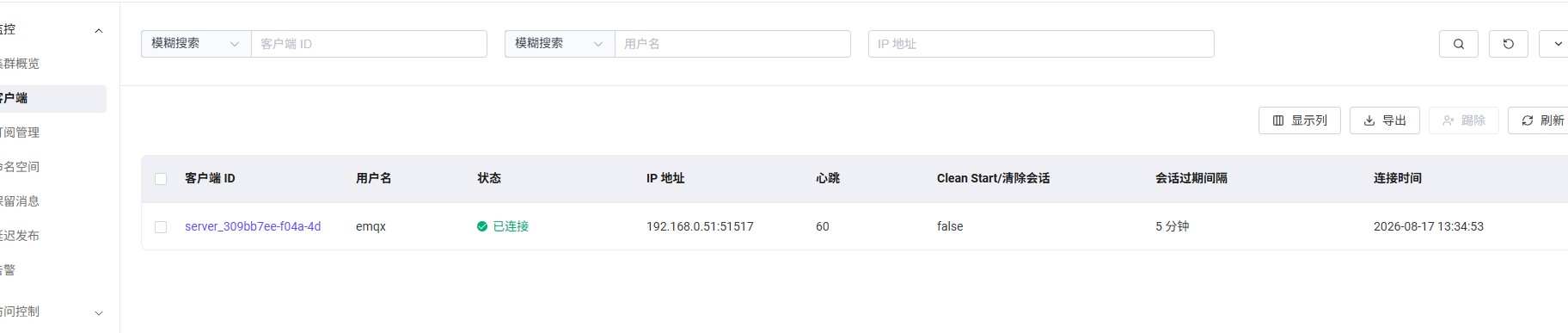
图二
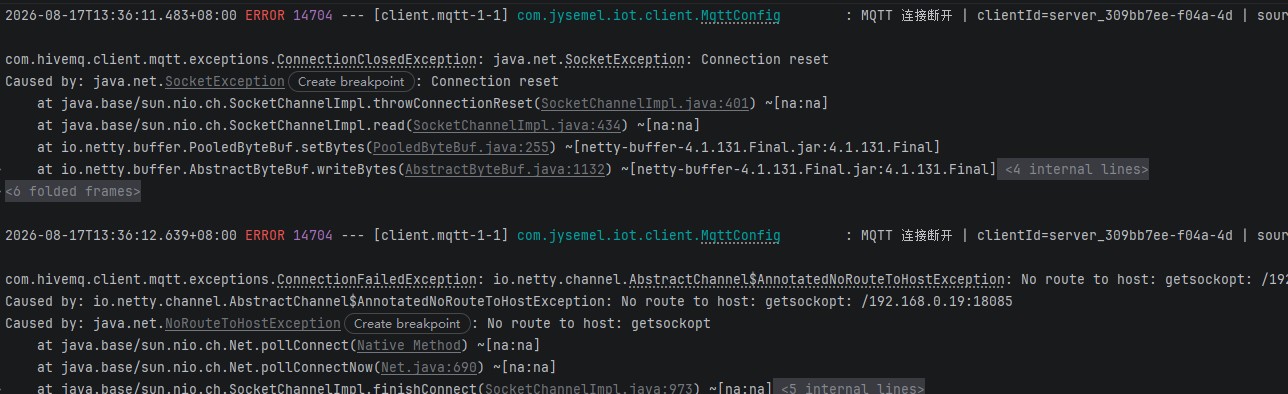
图三
图四

图五

图六
