物联网实战:Spring Boot MQTT | 模拟器Paho客户端sdk入门
IoT 设备模拟器 - 支持 MQTT、TCP、UDP、CoAP、HTTP 多种协议
源码(mqtt-simulator-sample00)
https://gitee.com/kcnf-iot/mqtt-simulator
搭载 emqx 公共免费的broker
https://www.emqx.com/zh/mqtt/public-mqtt5-broker
相关依赖
<!-- MQTT Client -->
<dependency>
    <groupId>org.eclipse.paho</groupId>
    <artifactId>org.eclipse.paho.mqttv5.client</artifactId>
    <version>1.2.5</version>
</dependency>
通用约定
package com.jysemel.iot;

public class ClientId {

    public static String clientId_1 = "jysemel-test-0001";
    public static String clientId_2 = "jysemel-test-0002";

    public static String topic = "demo-test-hello";

    // 免费的公共broker服务
    public static String brokerUrl = "tcp://broker.emqx.io:1883";
}
消息下发
package com.jysemel.iot;

import lombok.SneakyThrows;
import org.eclipse.paho.mqttv5.client.MqttClient;
import org.eclipse.paho.mqttv5.client.MqttConnectionOptions;
import org.eclipse.paho.mqttv5.common.MqttMessage;

/**
 * MQTT 5.0 消息发布示例类
 * 用于演示如何连接到 MQTT Broker 并发布消息
 */
public class MqttPublishDemo {

    @SneakyThrows
    public static void main(String[] args) {
        // 获取固定的客户端ID
        String clientId = ClientId.clientId_1;
        MqttClient client = null;

        try {
            // 创建 MQTT 客户端实例
            client = new MqttClient(ClientId.brokerUrl, clientId);

            // 配置 MQTT 连接选项
            MqttConnectionOptions options = new MqttConnectionOptions();
            // 设置为全新会话,不保留历史数据
            options.setCleanStart(true);
            // 启用自动重连功能
            options.setAutomaticReconnect(true);
            // 连接超时时间设置为10秒
            options.setConnectionTimeout(10);
            // 心跳间隔设置为20秒
            options.setKeepAliveInterval(20);

            // 连接到 Broker
            client.connect(options);
            System.out.println("已连接: " + clientId);
            Thread.sleep(5000);
            // 循环发布5条消息
            for (int i = 0; i < 5; i++) {
                // 构造消息内容,包含序号和时间戳
                String payload = "消息 " + i + " 时间: " + System.currentTimeMillis();
                // 创建 MQTT 消息对象
                MqttMessage msg = new MqttMessage(payload.getBytes());
                // 设置消息服务质量等级为1(至少送达一次)
                msg.setQos(1);
                // 发布消息到指定主题
                client.publish(ClientId.topic, msg);
                System.out.println("已发布: " + payload);
                // 暂停1秒后发布下一条
                Thread.sleep(1000);
            }

            // 断开与 Broker 的连接
            client.disconnect();
            System.out.println("已断开连接");

        } finally {
            // 确保资源被正确释放
            if (client != null) {
                client.close();
            }
        }
    }
}
消息订阅
package com.jysemel.iot;

import org.eclipse.paho.mqttv5.client.*;
import org.eclipse.paho.mqttv5.common.MqttException;
import org.eclipse.paho.mqttv5.common.MqttMessage;
import org.eclipse.paho.mqttv5.common.packet.MqttProperties;

import java.nio.charset.StandardCharsets;

/**
 * MQTT 5.0 消息订阅示例类
 * 实现了 MqttCallback 接口,用于接收和处理 MQTT 消息
 */
public class MqttSubscribeDemo implements MqttCallback {

    // MQTT 客户端实例
    private final MqttClient client;

    /**
     * 构造函数
     * @param broker MQTT Broker 地址
     * @param clientId 客户端ID
     * @throws MqttException MQTT异常
     */
    public MqttSubscribeDemo(String broker, String clientId) throws MqttException {
        // 创建 MQTT 客户端实例
        this.client = new MqttClient(broker, clientId);
        // 将当前类注册为回调处理器
        this.client.setCallback(this);
    }

    /**
     * 启动订阅服务
     * @throws Exception 异常
     */
    public void start() throws Exception {
        // 配置连接选项
        MqttConnectionOptions options = new MqttConnectionOptions();
        // 设置为全新会话
        options.setCleanStart(true);
        options.setAutomaticReconnect(true); // v5 自动重连

        System.out.println("正在连接到 Broker...");
        // 连接到 Broker
        client.connect(options);
        System.out.println("已连接,客户端ID: " + client.getClientId());

        // 订阅主题(QoS 1)
        client.subscribe(ClientId.topic, 1);
        System.out.println("已订阅主题: " + ClientId.topic);
    }

    /**
     * 停止订阅服务并释放资源
     */
    public void stop() {
        try {
            // 如果仍连接,先断开
            if (client.isConnected()) {
                client.disconnect();
                System.out.println("已断开连接。");
            }
            // 关闭客户端,释放资源
            client.close();
        } catch (MqttException e) {
            e.printStackTrace();
        }
    }

    // ===== MqttCallback 实现 =====

    /**
     * 消息到达回调
     * @param topic 消息主题
     * @param message 消息对象
     */
    @Override
    public void messageArrived(String topic, MqttMessage message) {
        // 将消息字节数组转换为字符串
        String payload = new String(message.getPayload(), StandardCharsets.UTF_8);
        // 打印接收到的消息信息
        System.out.printf("📩 收到主题 %s 的消息: %s (服务质量: %d)%n", topic, payload, message.getQos());
    }

    /**
     * 断开连接回调
     * @param disconnectResponse 断开连接响应
     */
    @Override
    public void disconnected(MqttDisconnectResponse disconnectResponse) {
        System.out.println("⚠️ 已断开连接: " + disconnectResponse.getReturnCode());
    }

    /**
     * MQTT 错误发生回调
     * @param exception MQTT 异常
     */
    @Override
    public void mqttErrorOccurred(MqttException exception) {
        System.err.println("❌ 错误: " + exception.getMessage());
    }

    /**
     * 消息发布完成回调
     * @param token 发布令牌
     */
    @Override
    public void deliveryComplete(IMqttToken token) {
        // 发布确认(仅当使用异步发布时才会触发)
    }

    /**
     * 连接完成回调
     * @param reconnect 是否是重连
     * @param serverURI 服务器URI
     */
    @Override
    public void connectComplete(boolean reconnect, String serverURI) {
        System.out.println("🔄 连接完成。是否重连: " + reconnect);
    }

    /**
     * 认证数据包到达回调
     * @param reasonCode 原因码
     * @param properties 属性
     */
    @Override
    public void authPacketArrived(int reasonCode, MqttProperties properties) {
        // 扩展认证(一般不用)
    }

    // ===== 主程序入口 =====
    public static void main(String[] args) throws Exception {
        // Broker 地址
        String broker = ClientId.brokerUrl;
        // 使用固定的客户端ID
        String clientId = ClientId.clientId_2;
        // 创建订阅示例实例
        MqttSubscribeDemo demo = new MqttSubscribeDemo(broker, clientId);
        // 启动订阅
        demo.start();
        System.out.println("正在监听消息... (按回车键退出)");
        System.in.read();           // 阻塞,等待用户按键
        // 停止订阅
        demo.stop();
    }
}
注意事项
- topic和clientID 规范
jysemel-test-0001 demo-test-hello
- Publish和Subscribe
模拟不同的两个总端通信,所以clientID保持不一样
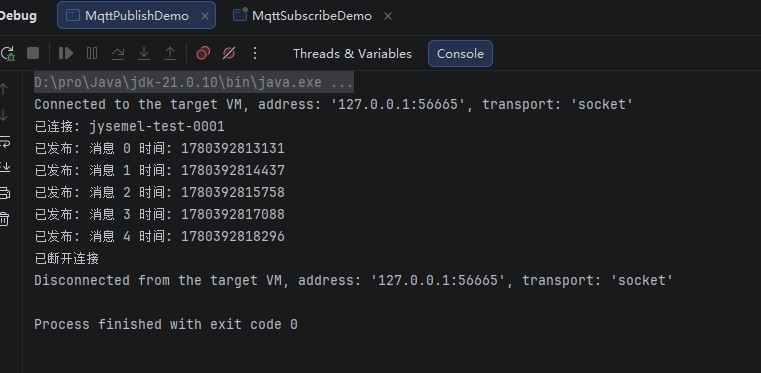
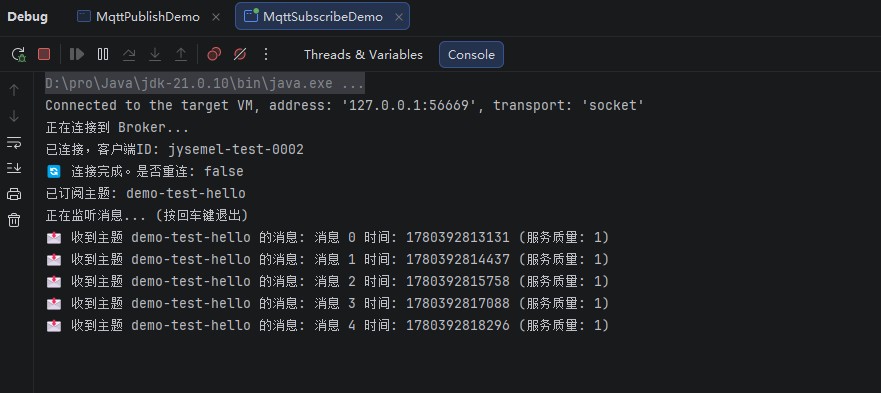
演示结果