物联网 Protobuf入门+梳理
它被设计为独立于编程语言,也独立于操作系统。这就意味着你可以用一种语言(比如 Java)定义一个数据结构和编码消息,然后用完全另一种语言(比如 Python 或 Go)来读取和解析它,而不会有任何障碍
支持跨语言清单
Protobuf 通过 protoc 编译器工具,可以直接为以下主流语言生成代码
编程语言: C++, C#, Dart, Go, Java, Kotlin
脚本 / 动态语言: Objective-C, PHP, Python, Ruby, Rust
源码(以java为例定义规范.proto)
https://gitee.com/kcnf-iot/iot-sample/tree/master/protobuf
如何跨语言
定义:你用一个中立的定义文件(.proto)来描述你想要的数据结构,比如定义个“用户”信息,它包含姓名和年龄。
生成与解码:然后使用 protoc 编译器处理这个 .proto 文件,为你需要的任意一门目标语言生成相应的数据操作类,供你的程序直接使用
关于约定(.proto文件如何管理)
将 .proto 文件放在独立目录(如 proto/),并用 Git 统一管理
使用 Buf 等工具:更专业的 Protobuf 管理工具,可以 lint、格式化、自动生成多语言代码
- 这里.proto文件主要位置在java项目中
跨语言实战
首先java语言定义模型文件
就是将传统的model.java文件,改变为proto文件
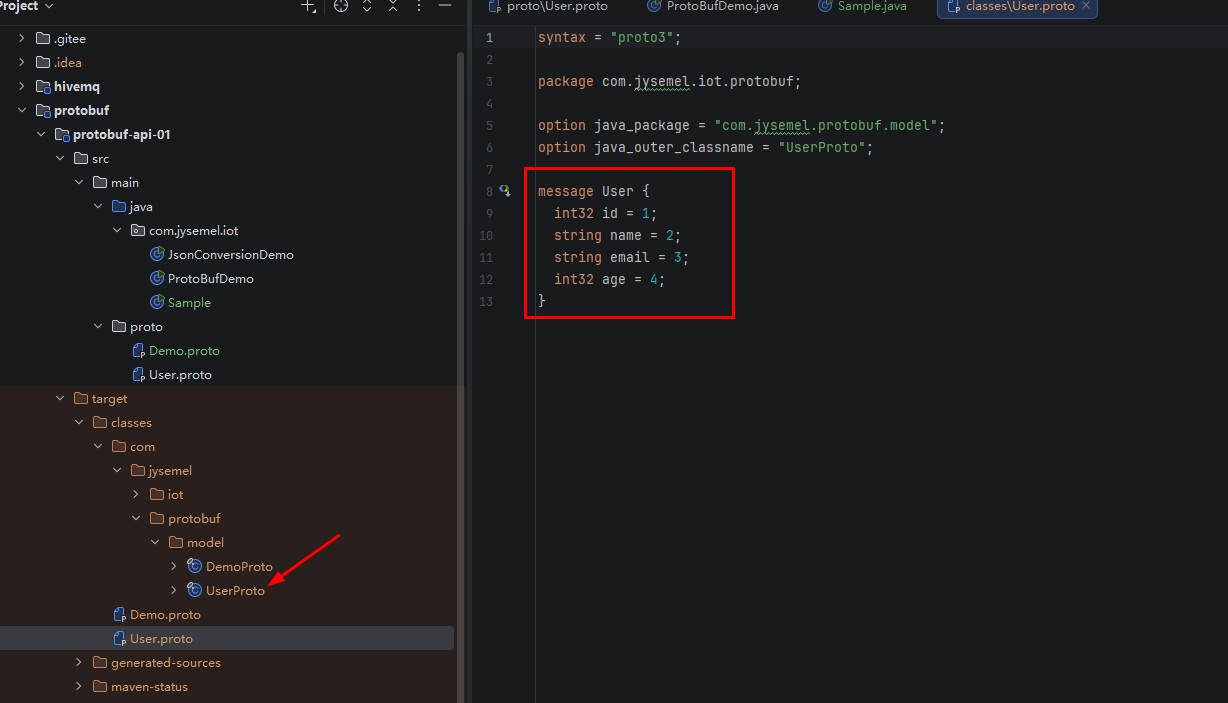
java中直接使用
package com.jysemel.iot;

import com.jysemel.protobuf.model.UserProto;

public class Sample {


    public static void main(String[] args) {
        // 1. 构建User对象
        UserProto.User user = UserProto.User.newBuilder()
                .setId(123)
                .setName("Alice")
                .setEmail("alice@example.com")
                .setAge(25)
                .build();

        System.out.println("User: " + user.getName());
    }
}
java 接收protobuf服务端
服务端源码
https://gitee.com/kcnf-iot/iot-sample/tree/master/protobuf/protobuf-sample-01
package com.jysemel.iot.config;


import org.springframework.context.annotation.Configuration;
import org.springframework.http.MediaType;
import org.springframework.http.converter.HttpMessageConverter;
import org.springframework.http.converter.protobuf.ProtobufHttpMessageConverter;
import org.springframework.web.servlet.config.annotation.WebMvcConfigurer;

import java.util.List;

@Configuration
public class ProtobufConfig implements WebMvcConfigurer {

    @Override
    public void extendMessageConverters(List<HttpMessageConverter<?>> converters) {
        // 添加 Protobuf 消息转换器,放在第一位以优先处理
        converters.add(0, new SelfProtobufHttpMessageConverter());
    }

    /**
     * 自定义 Protobuf HttpMessageConverter
     */
    public static class SelfProtobufHttpMessageConverter extends ProtobufHttpMessageConverter {
        public SelfProtobufHttpMessageConverter() {
            super();
            // 设置支持的媒体类型
            setSupportedMediaTypes(List.of(
                    MediaType.parseMediaType("application/x-protobuf"),
                    MediaType.parseMediaType("application/octet-stream")
            ));
        }
    }
}
python中客户端使用
https://gitee.com/kcnf-iot/python-protobuf
使用uv构建新项目
- 构建项目
uv init
- 添加依赖
uv add protobuf requests grpcio-tools
直接使用上面源码
- 添加依赖
uv sync
源码拆解
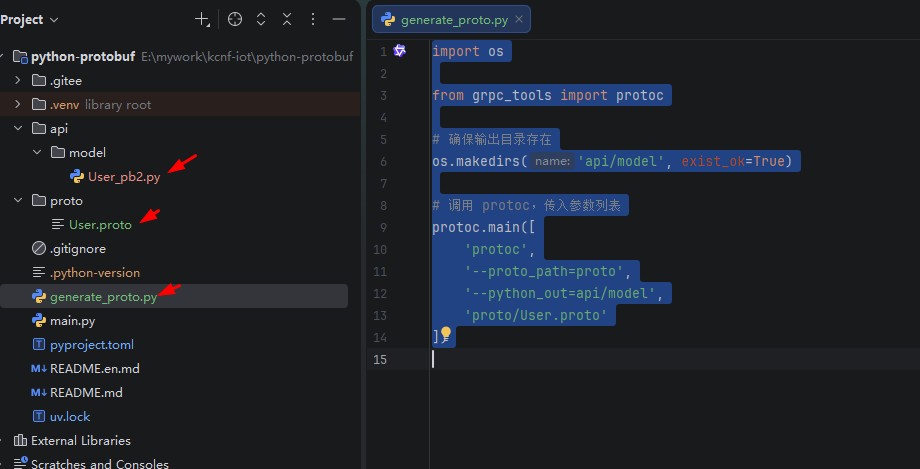
将java中.proto文件拷贝到python项目
执行下面脚本,解析proto文件,生成python代码
import os

from grpc_tools import protoc

# 确保输出目录存在
os.makedirs('api/model', exist_ok=True)

# 调用 protoc,传入参数列表
protoc.main([
    'protoc',
    '--proto_path=proto',
    '--python_out=api/model',
    'proto/User.proto'
])
- 项目结构如下:
python中使用和java通信
import requests

import api.model.User_pb2 as UserProto


def send_user_to_java():
    """创建 User protobuf 对象并发送到 Java 接口"""
    # 1. 创建 User 对象
    user = UserProto.User()
    user.id = 1
    user.name = "张三"
    user.email = "zhangsan@example.com"
    user.age = 25
    print(f"创建 User 对象: ID={user.id}, 姓名={user.name}, 邮箱={user.email}, 年龄={user.age}")
    # 2. 序列化为二进制数据
    serialized_data = user.SerializeToString()
    print(f"序列化后大小: {len(serialized_data)} bytes")
    # 3. 发送到 Java 接口
    java_api_url = "http://localhost:8081/api/users"
    try:
        response = requests.post(
            java_api_url,
            data=serialized_data,
            headers={'Content-Type': 'application/x-protobuf'},
            timeout=5
        )
        if response.status_code == 200:
            print(f"发送成功! 状态码: {response.status_code}")
            # 如果返回的也是 protobuf 数据,可以反序列化
            if response.content:
                result_user = UserProto.User()
                result_user.ParseFromString(response.content)
                print(f"返回结果: ID={result_user.id}, 姓名={result_user.name}")
        else:
            print(f"发送失败! 状态码: {response.status_code}, 响应: {response.text}")
    except Exception as e:
        print(f"发生错误: {e}")


if __name__ == "__main__":
    send_user_to_java()
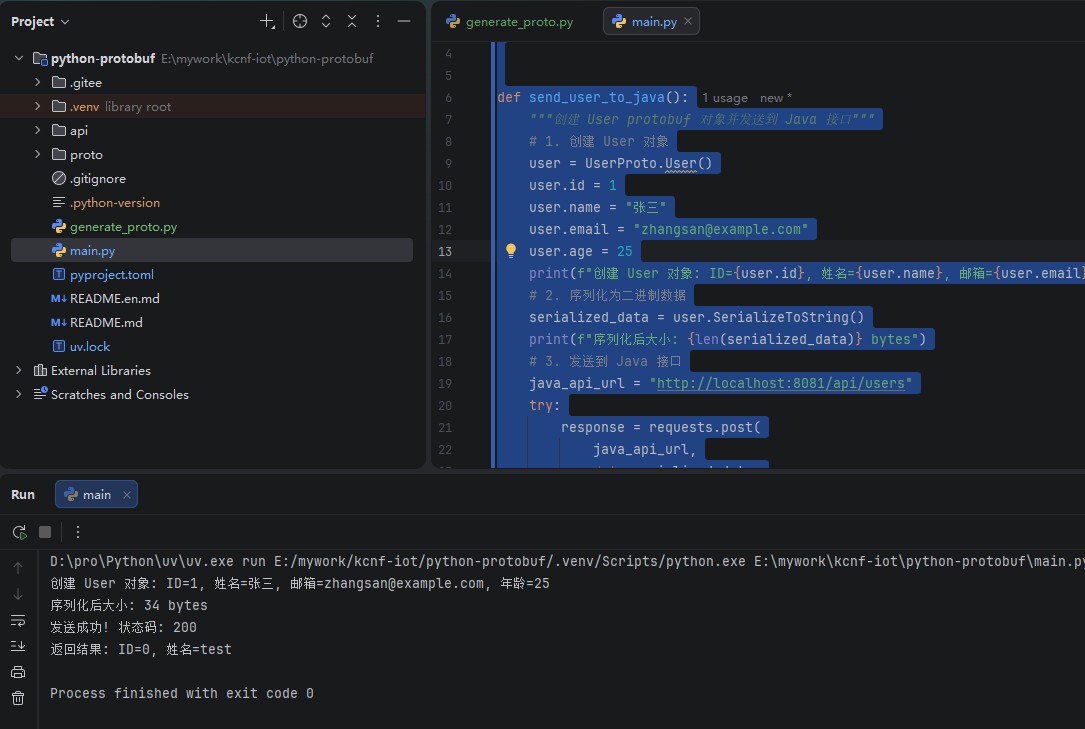
- 运行验证结果
typescript中客户端使用
https://gitee.com/kcnf-iot/typescript-protobuf
- 先执行如下命令,构建项目
pnpm install protobufjs axios
- main.ts
import axios from 'axios';
import * as protobuf from 'protobufjs';

async function main() {
    const root = await protobuf.load("proto/User.proto");
    const User = root.lookupType("com.jysemel.iot.protobuf.User");

    const createReq = User.encode({ id:3, name: "NodeClient", email: "node@ex.com", age: 28 }).finish();
    const resp = await axios.post("http://localhost:8081/api/users", createReq, {
        headers: { "Content-Type": "application/x-protobuf" },
        responseType: 'arraybuffer'
    });

    const created = User.decode(new Uint8Array(resp.data));
}

main();
- 运行命令
pnpm run build
pnpm start
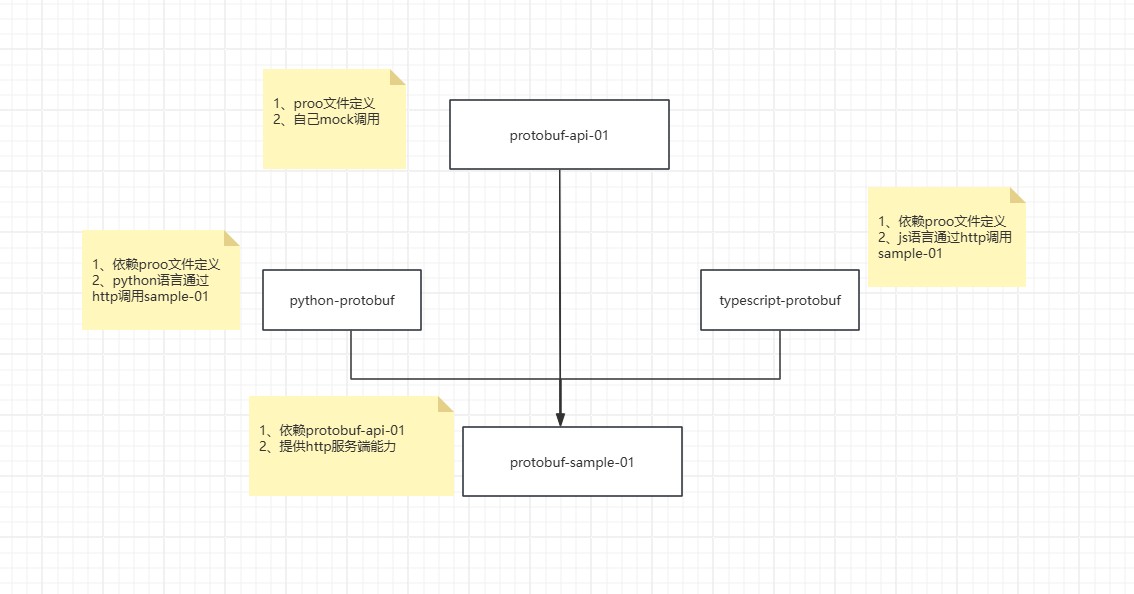
完整的演示项目关系图
- proto文件定义源码
https://gitee.com/kcnf-iot/iot-sample/tree/master/protobuf/protobuf-api-01
- protobu服务端源码
https://gitee.com/kcnf-iot/iot-sample/tree/master/protobuf/protobuf-sample-01
- python-protobuf源码
https://gitee.com/kcnf-iot/python-protobuf
- typescript-protobuf源码
https://gitee.com/kcnf-iot/typescript-protobuf