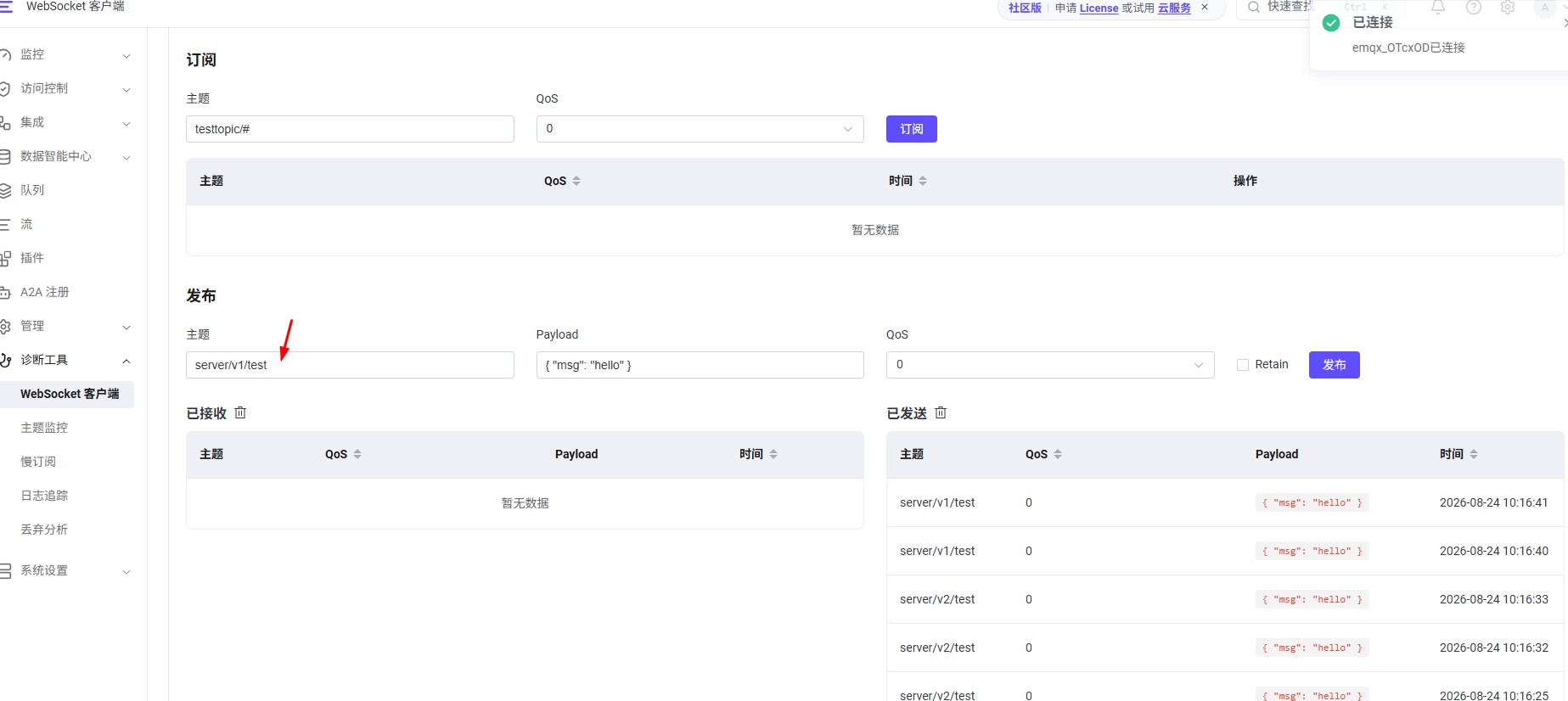
物联网实战|Spring Boot MQTT平台|emqx订阅去重问题
基于emqx v6.2.2 版本
客户端
基于hivemq sdk,版本为1.3.15
源码
https://gitee.com/kcnf-iot/iot-sample/tree/master/emqx/emqx-sample-04
解决场景问题
服务端分布式部署,结合emqx进行消息订阅去重
解决方案
EMQX 实现了 MQTT 的共享订阅功能。共享订阅是一种订阅模式,用于在多个订阅者之间实现负载均衡
https://docs.emqx.com/zh/emqx/latest/messaging/mqtt-shared-subscription.html
前置条件
正常主题订阅
- server/v1/test
共享主题订阅
- $share/g1/server/v2/test
- 基于正常主题订阅前面增加 $share/g1, 发布端不做任何调整
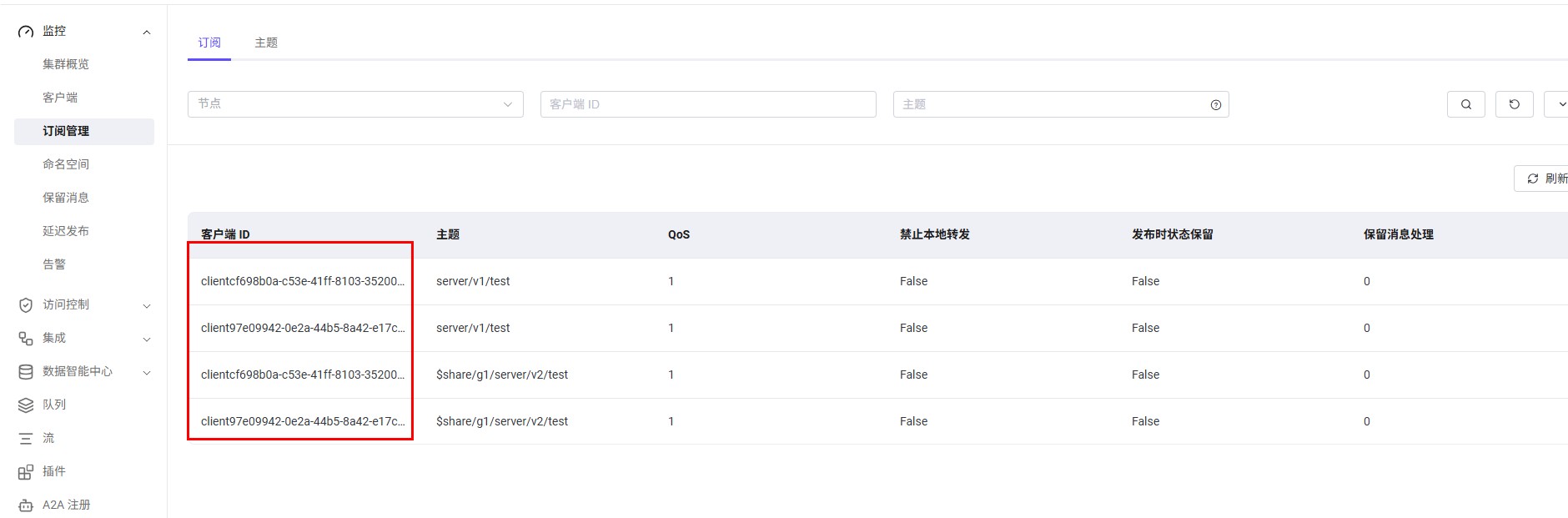
服务端clientID不能重复
这里重点注意:
pom依赖
<dependencies>
    <!-- HiveMQ MQTT5 客户端(同时兼容 MQTT3.1.1) -->
    <dependency>
        <groupId>com.hivemq</groupId>
        <artifactId>hivemq-mqtt-client</artifactId>
        <version>1.3.15</version>
    </dependency>
</dependencies>
部分代码
模拟不同订阅客户端
package com.jysemel.iot.client;

import com.hivemq.client.mqtt.mqtt5.Mqtt5AsyncClient;
import com.hivemq.client.mqtt.mqtt5.Mqtt5Client;
import lombok.extern.slf4j.Slf4j;
import org.springframework.context.annotation.Bean;
import org.springframework.context.annotation.Configuration;
import org.springframework.context.annotation.Primary;

import java.util.UUID;

@Slf4j
@Configuration
public class MqttConfig {


    @Primary
    @Bean(name = "mqtt5AsyncClient1")
    public Mqtt5AsyncClient mqtt5AsyncClient1() {
        // 使用 Builder 模式创建异步客户端
        Mqtt5AsyncClient client = Mqtt5Client.builder()
                .identifier("client" + UUID.randomUUID()) // 设置客户端ID,需唯一
                .serverHost("192.168.0.19") // Broker 地址
                .serverPort(1883) // 默认非加密端口
                .buildAsync(); // 构建异步客户端

        // 连接到 Broker
        client.connect()
                .whenComplete((connAck, throwable) -> {
                    if (throwable != null) {
                        System.err.println("MQTT 连接失败: " + throwable.getMessage());
                        // 可以在这里添加重试逻辑
                    } else {
                        System.out.println("MQTT 连接成功!");
                    }
                });
        return client;
    }


    @Bean(name = "mqtt5AsyncClient2")
    public Mqtt5AsyncClient mqtt5AsyncClient2() {
        // 使用 Builder 模式创建异步客户端
        Mqtt5AsyncClient client = Mqtt5Client.builder()
                .identifier("client" + UUID.randomUUID()) // 设置客户端ID,需唯一
                .serverHost("192.168.0.19") // Broker 地址
                .serverPort(1883) // 默认非加密端口
                .buildAsync(); // 构建异步客户端

        // 连接到 Broker
        client.connect()
                .whenComplete((connAck, throwable) -> {
                    if (throwable != null) {
                        System.err.println("MQTT 连接失败: " + throwable.getMessage());
                        // 可以在这里添加重试逻辑
                    } else {
                        System.out.println("MQTT 连接成功!");
                    }
                });
        return client;
    }
}
模拟正常订阅
package com.jysemel.iot.client;

import com.hivemq.client.mqtt.datatypes.MqttQos;
import com.hivemq.client.mqtt.mqtt5.Mqtt5AsyncClient;
import jakarta.annotation.PostConstruct;
import org.springframework.beans.factory.annotation.Autowired;
import org.springframework.beans.factory.annotation.Qualifier;
import org.springframework.stereotype.Service;

import java.nio.charset.StandardCharsets;

@Service
public class MqttSubscribe1Service {

    @Autowired
    @Qualifier("mqtt5AsyncClient1")
    private Mqtt5AsyncClient mqtt5AsyncClient1;

    // 使用 @PostConstruct 在 Bean 初始化后自动订阅
    @PostConstruct
    public void subscribe() {
        String topic = "server/v1/test";
        mqtt5AsyncClient1.subscribeWith()
                .topicFilter(topic) // 订阅的主题
                .qos(MqttQos.AT_LEAST_ONCE)
                .callback(publish -> {
                    // 处理收到的消息
                    String payload = new String(publish.getPayloadAsBytes(), StandardCharsets.UTF_8);
                    System.out.println(this.getClass() + " 收到消息,主题: " + topic + ", 内容: " + payload);
                })
                .send()
                .whenComplete((subAck, throwable) -> {
                    if (throwable != null) {
                        System.out.println(this.getClass() + " 订阅失败: " + throwable.getMessage());
                    } else {
                        System.out.println(this.getClass() + " 订阅主题 "+topic+" 成功!");
                    }
                });
    }
}
模拟共享分组订阅
package com.jysemel.iot.client;

import com.hivemq.client.mqtt.datatypes.MqttQos;
import com.hivemq.client.mqtt.mqtt5.Mqtt5AsyncClient;
import jakarta.annotation.PostConstruct;
import org.springframework.beans.factory.annotation.Autowired;
import org.springframework.beans.factory.annotation.Qualifier;
import org.springframework.stereotype.Service;

import java.nio.charset.StandardCharsets;

@Service
public class MqttShareSubscribe1Service {

    @Autowired
    @Qualifier("mqtt5AsyncClient1")
    private Mqtt5AsyncClient mqtt5AsyncClient1;

    // 使用 @PostConstruct 在 Bean 初始化后自动订阅
    @PostConstruct
    public void subscribe() {
        String topic = "$share/g1/server/v2/test";
        mqtt5AsyncClient1.subscribeWith()
                .topicFilter(topic) // 订阅的主题
                .qos(MqttQos.AT_LEAST_ONCE)
                .callback(publish -> {
                    // 处理收到的消息
                    String payload = new String(publish.getPayloadAsBytes(), StandardCharsets.UTF_8);
                    System.out.println(this.getClass() + " 共享收到消息,主题: " + topic + ", 内容: " + payload);
                })
                .send()
                .whenComplete((subAck, throwable) -> {
                    if (throwable != null) {
                        System.out.println(this.getClass() + " 共享订阅失败: " + throwable.getMessage());
                    } else {
                        System.out.println(this.getClass() + " 共享订阅主题 "+topic+" 成功!");
                    }
                });
    }
}
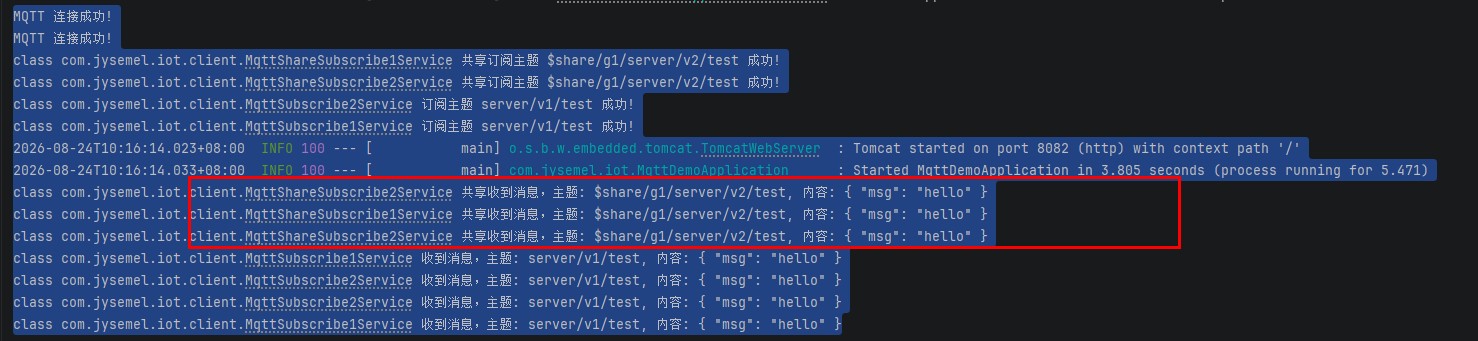
启动和订阅收到日志
模拟发布