砍材农夫砍材农夫
  • vuepress搭建
  • hexo搭建
  • 面试题
  • 常用工具

    • git
    • gradle
    • Zadig
    • it-tools
    • 开源推荐
    • curl
  • 大前端

    • npm
    • webpack
    • 微信
    • 正则
    • uniapp
    • nodejs
  • java

    • java基础
    • jdk体系
    • jvm
    • spring
    • spring_cloud
    • spring_boot
    • 分库分表
    • zookeeper
  • python

    • python基础
  • 网关

    • spring_cloud_gateway
    • openresty
  • 高可用

    • 秒杀
    • 分布式
    • 缓存一致
  • MQ

    • MQ
    • rabbitMQ
    • rocketMQ
    • kafka
  • 其它

    • 设计模式
    • 领域驱动(ddd)
  • 关系型数据库

    • mysql5.0
    • mysql8.0
  • 非关系型数据库

    • redis
    • mongoDB
  • 分布式/其他

    • ShardingSphere
    • 区块链
  • 向量数据库

    • M3E
    • OPEN AI
  • Jmeter
  • fiddler
  • wireshark
  • AI入门
  • AI工具
  • AI集成框架
  • 大模型
  • gitee
  • github
  • infoq
  • osc
  • 砍材工具
  • 关于
  • docker
  • k8s
  • devops
  • nginx
  • 元宇宙
  • 区块链
  • 物联网
  • linux
  • webrtc
  • web3.0
  • gitee
  • github
  • infoq
  • osc
  • 砍材工具
  • 关于
  • 中考
  • 投资
  • 保险
  • vuepress搭建
  • hexo搭建
  • 面试题
  • 常用工具

    • git
    • gradle
    • Zadig
    • it-tools
    • 开源推荐
    • curl
  • 大前端

    • npm
    • webpack
    • 微信
    • 正则
    • uniapp
    • nodejs
  • java

    • java基础
    • jdk体系
    • jvm
    • spring
    • spring_cloud
    • spring_boot
    • 分库分表
    • zookeeper
  • python

    • python基础
  • 网关

    • spring_cloud_gateway
    • openresty
  • 高可用

    • 秒杀
    • 分布式
    • 缓存一致
  • MQ

    • MQ
    • rabbitMQ
    • rocketMQ
    • kafka
  • 其它

    • 设计模式
    • 领域驱动(ddd)
  • 关系型数据库

    • mysql5.0
    • mysql8.0
  • 非关系型数据库

    • redis
    • mongoDB
  • 分布式/其他

    • ShardingSphere
    • 区块链
  • 向量数据库

    • M3E
    • OPEN AI
  • Jmeter
  • fiddler
  • wireshark
  • AI入门
  • AI工具
  • AI集成框架
  • 大模型
  • gitee
  • github
  • infoq
  • osc
  • 砍材工具
  • 关于
  • docker
  • k8s
  • devops
  • nginx
  • 元宇宙
  • 区块链
  • 物联网
  • linux
  • webrtc
  • web3.0
  • gitee
  • github
  • infoq
  • osc
  • 砍材工具
  • 关于
  • 中考
  • 投资
  • 保险
  • 首页
    • window相关安装和配置
      • 首先 确认
      • 第一步 启用Hyper-v并开启虚拟任务
      • 第二步 安装docker desktop
      • 第三步 docker desktop 如何设置镜像源
    • window基础简单操作
    • linux安装
    • 相关概念
    • 相关命令
    • docker镜像相关命令
    • 安装elasticsearch
    • 镜像的迁移和备份
    • 构建私有仓库
    • 网络
    • 常见错误集
    • docker其他常见快速部署
    • dockerfile
    • dockerfile案例(springboot)
    • docker-compose意义
    • docker-compose
    • docker搭建Jenkins
    • docker部署hdfs
    • docker容器时间和本地时间不一致
    • docker批量操作
  • 首先 确认
  • 第一步 启用Hyper-v并开启虚拟任务
  • 第二步 安装docker desktop
  • 第三步 docker desktop 如何设置镜像源

首先 确认

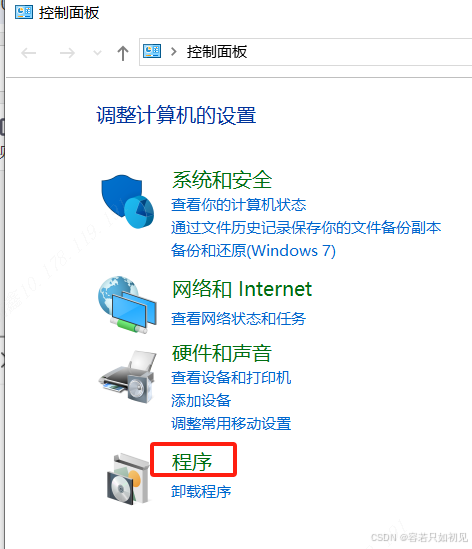
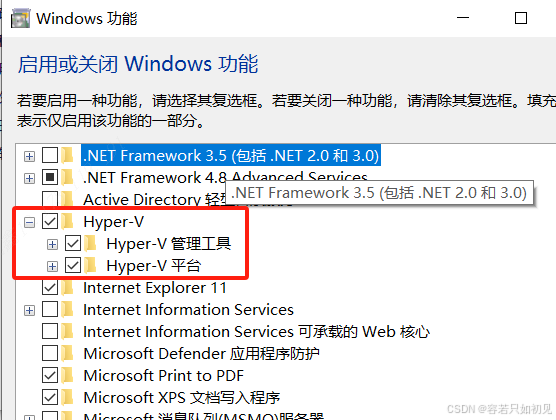
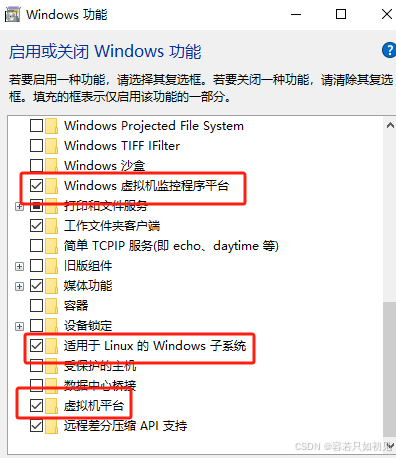
Hyper-v 和 wsl2
推荐 采用 vm 虚拟机 和 virtualbox 虚拟机 linux

第一步 启用Hyper-v并开启虚拟任务

Image textImage textImage textImage text

第二步 安装docker desktop

安装docker desktop
https://docker.github.net.cn/manuals/

包含组件[docker engine、docker compose、docker cli]

http://download.suanjiayun.com/Docker/
对于 Windows,通常 Docker Desktop 会自动安装 Docker Compose

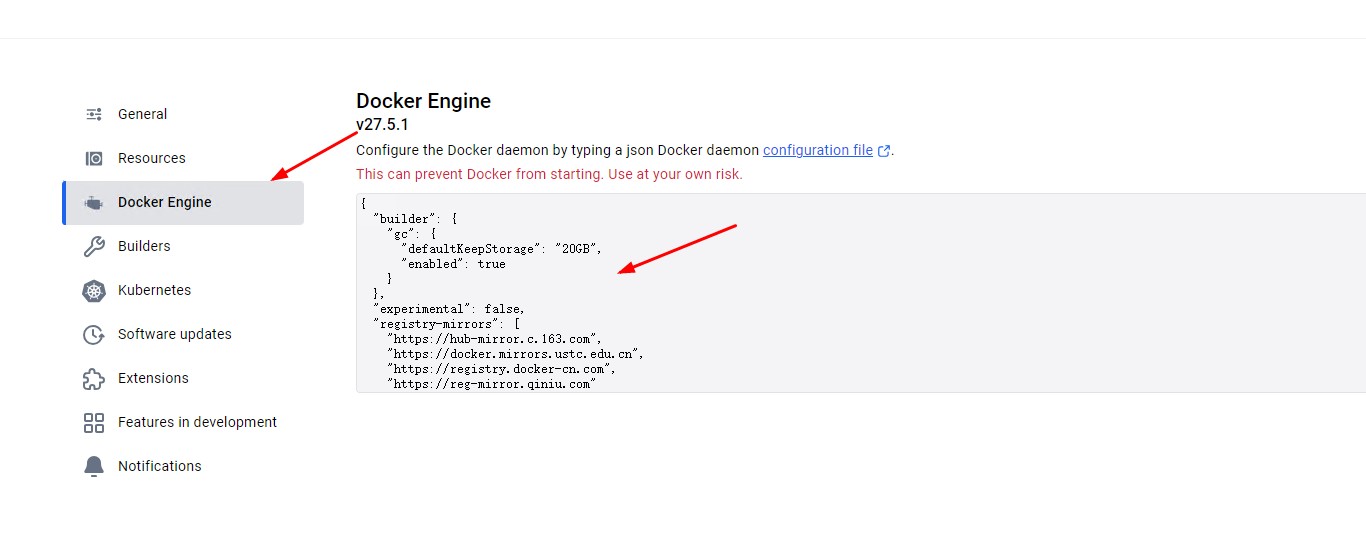
第三步 docker desktop 如何设置镜像源

Image text

打开setting里面找到Docker Engine 替换为如下:

{
  "builder": {
    "gc": {
      "defaultKeepStorage": "20GB",
      "enabled": true
    }
  },
  "debug": false,
  "experimental": false,
  "features": {
    "buildkit": true
  },
  "insecure-registries": [],
  "registry-mirrors": [
    "http://hub-mirror.c.163.com",
        "https://mirrors.tuna.tsinghua.edu.cn",
        "http://mirrors.sohu.com",
        "https://ustc-edu-cn.mirror.aliyuncs.com",
        "https://ccr.ccs.tencentyun.com",
        "https://docker.m.daocloud.io",
        "https://docker.awsl9527.cn"
  ]
}


通过cmd 客户端 执行命令 docker info 查看是否正常

Last Updated:
Contributors: jysemel
Next
window基础简单操作